
A/B Video Watermarking: Turning Two Signals into a Recoverable Identifier

A single invisible watermark can answer one useful question: is this video marked? In production, teams often need a second answer: which content record, generation session, recipient, or distribution event does it belong to?
A/B video watermarking uses two independently detectable signals - A and B - as symbols over time. The ordered sequence across video chunks becomes a recoverable identifier.
TurboMark provides DeepMark's video watermarking signal. The C++ A/B Video Watermarking SDK provides the workflow around it: embed A or B per chunk, detect the signal later, synchronize the sequence, and recover the identifier. The idea is simple in principle; in production, those signals still have to survive codecs, fit into an existing compute pipeline, and stay within the latency budget.
Why A/B Instead of a Single Watermark?
A single watermark is useful when the only question is whether a video has been marked. But many real-world workflows need more than a yes-or-no answer.
If a watermark is associated with a content record, generation session, recipient, or distribution event, the detector needs to recover more than the presence of a signal. It needs to recover information.
A/B video watermarking does this by treating two detectable watermark variants as symbols over time. Each video chunk carries either signal A or signal B, and the resulting sequence represents an identifier.
For example, a sequence such as A-B-A-A-B can be interpreted as part of a binary message. The exact meaning of that identifier is left to the application: it can point to a database entry, a content record, or another external source of metadata.
This keeps the watermarking layer focused on a simple task: carry a recoverable identifier through the video, while the application decides what that identifier represents.
Synchronization: Knowing Where the Identifier Starts
A sequence of A and B signals only becomes useful when the detector knows where to start reading it. In a real video pipeline, detection may begin at an arbitrary point in the stream rather than exactly at the beginning of an encoded identifier.
For that reason, each encoded sequence starts with synchronization symbols before the identifier payload. Their purpose is simple: establish a known starting point so that the following A/B chunks can be interpreted in the correct order.
Once synchronization is established, the detector can move from individual A/B decisions to recovering the identifier represented by the sequence. This is especially important for longer videos and streaming scenarios, where assuming that detection always starts from the first frame would not be practical.
Sparse Watermarking: Not Every Frame Needs to Be Watermarked
Sparse watermarking is useful when watermarking every single frame is unnecessary. Instead, the watermark can be embedded only into selected frames within the video stream.
This gives developers control over how frequently watermarking is applied. A denser configuration can provide more watermark-bearing frames, while a sparser configuration reduces how often the embedding step needs to run.
The key point is that sparse embedding still works with the same overall A/B sequence. The identifier is carried over time, but the watermark itself does not need to be present in every frame for the detector to recover the sequence.
For a production pipeline, this creates a practical trade-off between how often frames are watermarked, how much processing is added, and how quickly enough information becomes available for detection and identifier recovery.
What Does the Watermark Look Like?
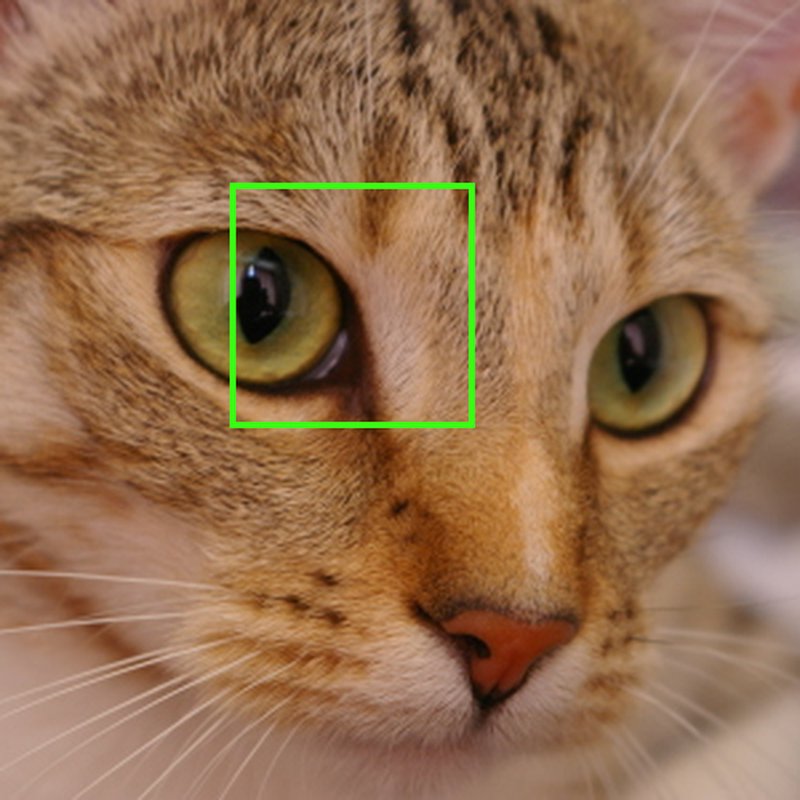
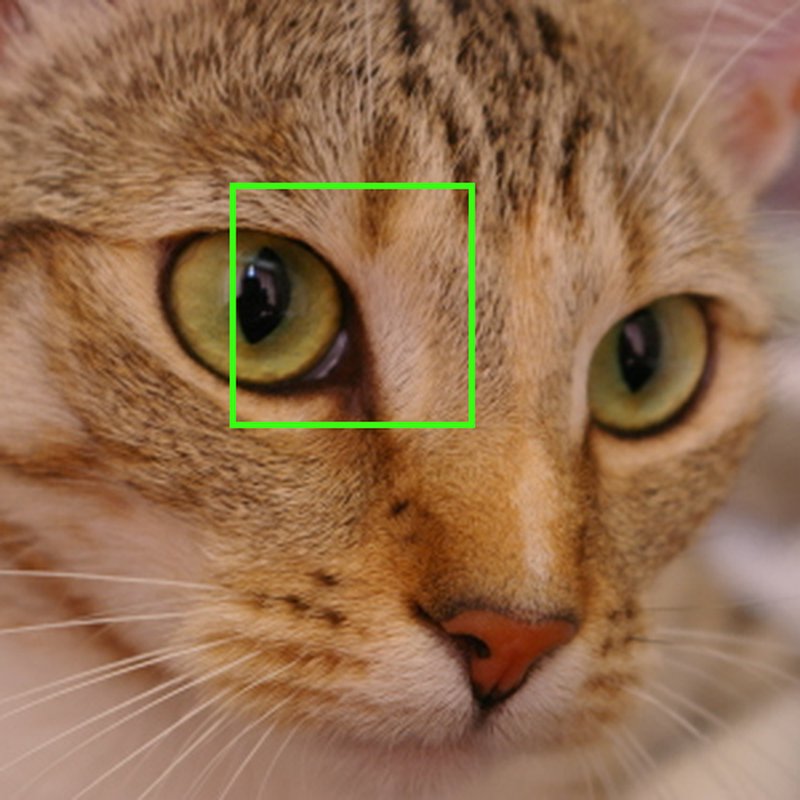
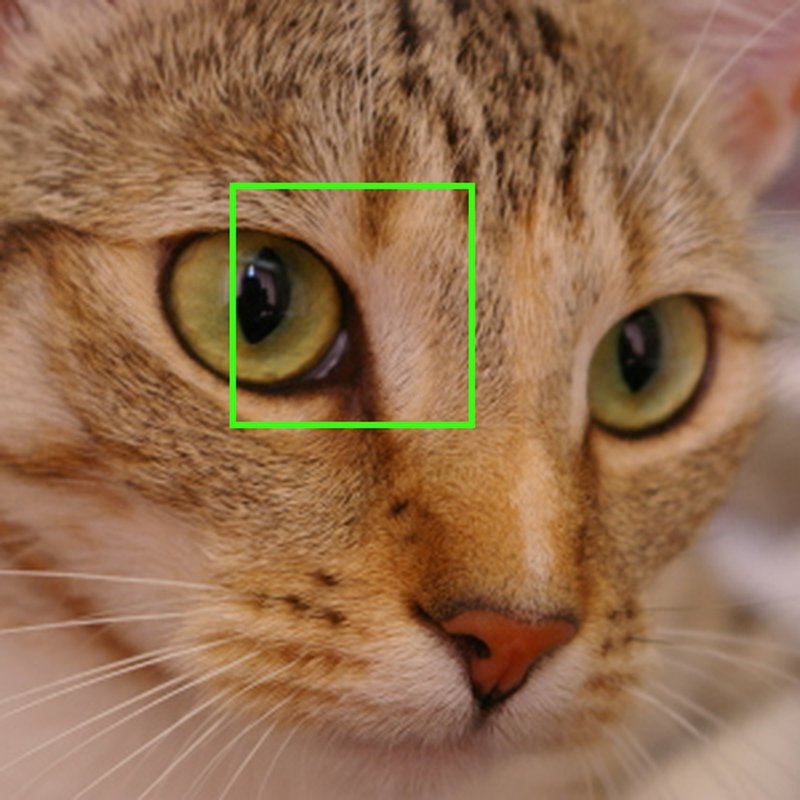
The identifier is useful only if embedding it does not come at the expense of the viewing experience. TurboMark is designed to keep the watermark visually unobtrusive, so the marked frames remain close to the original video content.
The comparison below shows the same frame before watermarking and after embedding variants A and B. From left to right: Original, Variant A, and Variant B. The second row shows the same region at a higher zoom.



Integrating A/B Watermarking Into a Video Pipeline
The A/B Video Watermarking SDK is designed to fit into an existing video pipeline rather than replace it. The application provides video frames in chunks, chooses whether to embed signal A or signal B, and receives the processed frames back in the same workflow.
On the detection side, chunks of video are passed to the SDK and analyzed for the presence of the A/B watermark signal. These detections can then be used to synchronize the sequence and recover the corresponding identifier.
The SDK supports both CPU and GPU execution, allowing the same integration pattern to be used across different deployment environments. It also supports common video input formats such as RGB and YUV, which makes it easier to connect the watermarking step to existing decode, processing, and encode stages.
From the application’s point of view, the flow is intentionally simple:
video frames → embed A or B → continue through the video pipelineand later:
video frames → detect A/B → synchronize → recover identifierThis keeps the watermarking logic separate from the rest of the video infrastructure. The application decides when to embed, how frequently to apply sparse watermarking, and what the recovered identifier means.
Latency in a Real Video Pipeline
A watermarking system is only useful in production if it can keep up with the video it is supposed to process. For the A/B Video Watermarking SDK, this means looking not only at whether embedding and detection work, but also at how much processing time they add to the pipeline.
Since the SDK processes video in chunks, its latency is closely tied to the conditions of the pipeline itself: execution device, video resolution, chunk size, and operation type: embedding or detection.
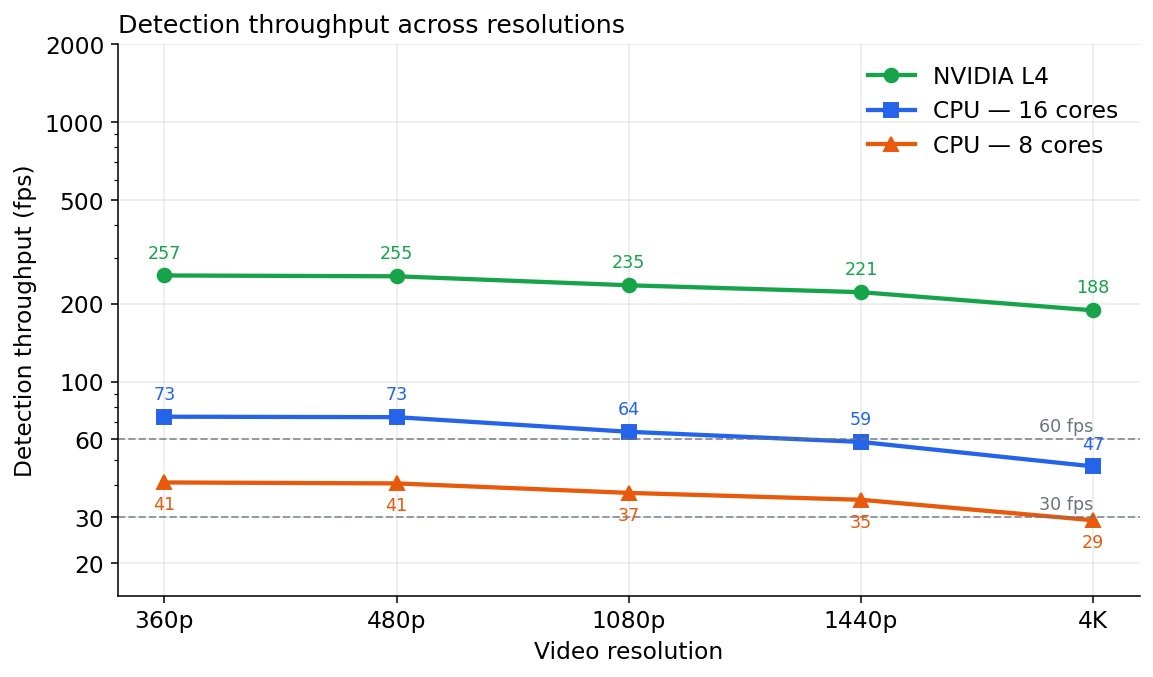
For the measurements below, we used an NVIDIA L4 GPU and evaluated the SDK across five video resolutions, from 360p to 4K. The chunk size was fixed at 16 frames for every run, while embedding and detection were measured separately under the same benchmark setup.
Performance at a Glance
| Resolution | Embed latency ms/fps | Detect latency ms/fps | |
|---|---|---|---|
| 360p | 11 / 1450 | 62 / 260 | |
| 480p | 16 / 1000 | 63 / 255 | |
| 1080p | 21 / 760 | 68 / 235 | |
| 1440p | 32 / 500 | 72 / 220 | |
| 2160p | 64 / 250 | 85 / 190 |
CPU Performance
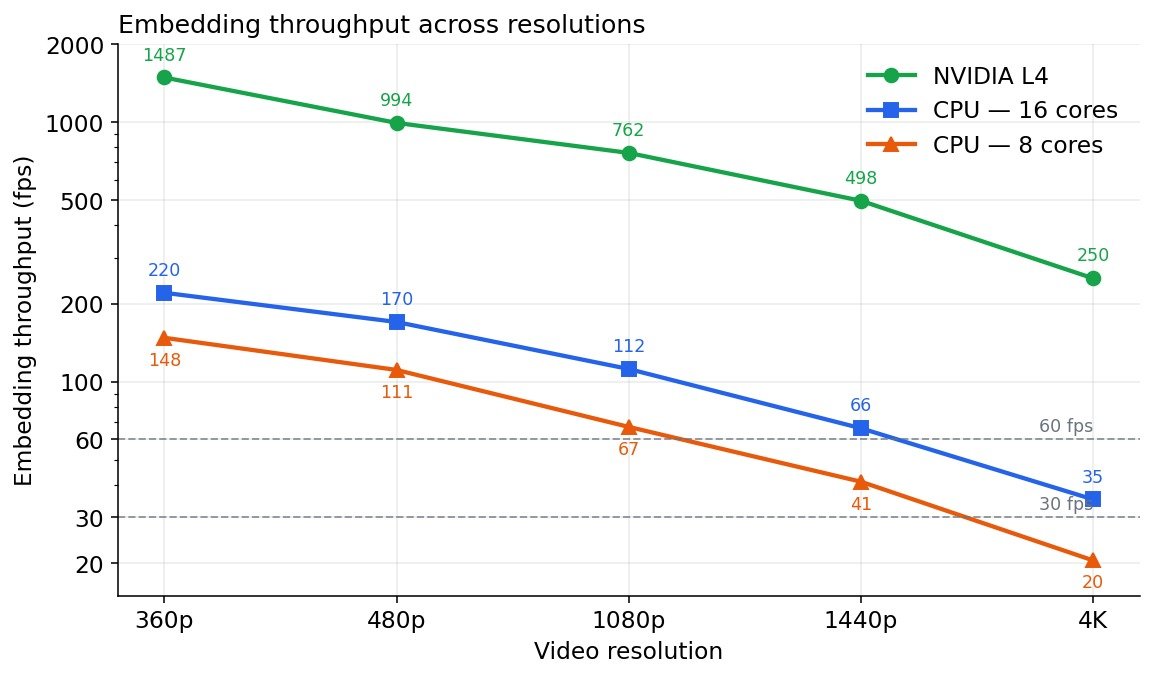
GPU acceleration provides the highest throughput, but not every deployment has—or needs—a dedicated GPU. To evaluate the CPU path, we benchmarked the SDK on an Intel Xeon Platinum 8375C, first with 8 CPU cores and then with 16 CPU cores.
As in the GPU benchmark, the chunk size was fixed at 16 frames, and the reported values are p50 latencies measured after warmup.
| Resolution | Embed latency ms/fps | Detect latency ms/fps | |
|---|---|---|---|
| 360p | 108 / 150 | 390 / 40 | |
| 480p | 144 / 110 | 400 / 40 | |
| 1080p | 240 / 65 | 430 / 37 | |
| 1440p | 390 / 40 | 450 / 35 | |
| 2160p | 780 / 20 | 550 / 30 |
| Resolution | Embed latency ms/fps | Detect latency ms/fps | |
|---|---|---|---|
| 360p | 75 / 220 | 220 / 75 | |
| 480p | 95 / 170 | 215 / 73 | |
| 1080p | 150 / 110 | 250 / 65 | |
| 1440p | 250 / 67 | 275 / 60 | |
| 2160p | 450 / 35 | 340 / 50 |
Scaling With CPU Resources
Increasing the available CPU resources produces a clear improvement in throughput. At 1080p, detection increases from 37 fps with 8 cores to 64 fps with 16 cores, a gain of approximately 1.7×. At 4K, detection increases from 29 fps to 47 fps, or approximately 1.6×.
Embedding shows a similar trend. At 1080p, throughput increases from 67 fps to 112 fps, while at 4K it increases from 20 fps to 35 fps.
What This Means in Practice
The results show that A/B watermarking can carry more than a presence signal without turning watermarking into the bottleneck of the video pipeline. That is where it becomes useful as infrastructure, not just as a watermark.




Mark what you generate. Prove what you ship.
Compliance you can demonstrate today, and a path to verified AI voice your customers actually trust, both built into the media you already produce.